The prior notebook section (Creating the R6Hub with Claude) covers building the basics of the tracker with Claude. At this point, I had spent ~1 hour to generate a fairly good outcome. I turned my attention to see how I could refine it.
Starting a new chat
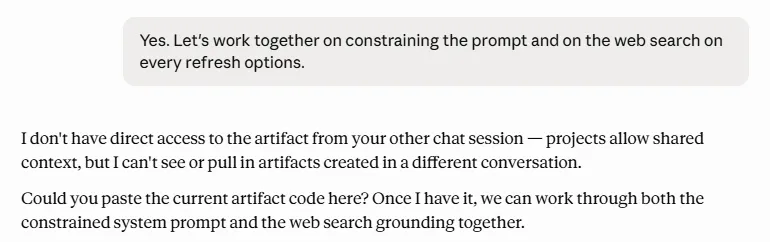
I decided to start a new chat in my Claude Project. At the time, I thought it made sense as a natural break. Later, I learned this can also be a good practice to stop bloating Claude’s context window ❝DefinitionContext WindowFrom IBM:From IBM:The context window (or “context length”) of a large language model (LLM) is the amount of text (sic) that the model can consider or “remember” at any one time.Effectively, this is an LLM’s memory, or how much info it re-reads each time it thinks through an answer. The bigger the context window, the more the LLM rereads, and uses up more of your usage limit.(adding too much context can be bad; it’s an effect called context stuffing).❝DefinitionContext StuffingFrom AIMenta:From AIMenta:The anti-pattern of cramming as much retrieved content as possible into an LLM prompt, betting that more context yields better answers.Some context is good, but too much can impair your use of the LLM, or even degrade its performance. AI is obviously an evolving field, but the benefit is there is a lot of research into it. This paper (2023, Liu, N. F. et al) is a great example. The authors show that having too much context can hurt LLM accuracy, especially as it weighs context near the start or end of it’s context window more heavily.Here’s a couple blogs with good how-to tips on reducing your usage: How to AI and Artificial Corner) My first challenge: get Claude to see the Artifact that had been created in the prior chat. When I had read that “Projects allow shared context”, I thought that I could reference a common history and tell Claude to get information from another chat. This was incorrect. When I asked Claude to access the Artifact from the prior session, it informed me that it did not have access to other chats, in a Project or not.
Screenshot from my chat
I was a little confused about the utility of Projects at this point. Digging some more, I learned that the true utility of Projects comes from the ability to create a shared repository by uploading documents, and from the ability to create Project-specific instruction sets. This lets you set up a very specific version of Claude that is knowledgeable on a specific topic and acts in a specific way without affecting your broader Claude setup. In effect, with each Project you can create a bespoke Claude that’s perfectly suited for the task at hand.
Now that I knew this, I still had to find a way to get this new chat to know about the Artifact. At this point I wasn’t ready to say the Artifact was in a finalized state and I planned to keep iterating on it, so I opted to copy it into a chat instead of adding it as a file to the project. Finally, Claude could see what had been built so far and so we could get to work.
I wanted to share a little detail on the goals I tried to achieve with my refinements, and some of the tactics that came out of it. While my methodology was not the best, I do think there were some practical tactics that came up.
Anti-Hallucination
My first idea was to focus on the accuracy of the output. One risk I’ve read about - and seen, in my occasional use of AI as a search tool - are hallucinations.❝DefinitionHallucinationsFrom Stanford University's Institute for Human-Centered Artificial Intelligence:From Stanford University’s Institute for Human-Centered Artificial Intelligence:Hallucinations refers to instances where an artificial intelligence system generates information or responses that are incorrect, misleading, or entirely fabricated but presented as factual. This often happens in language models or image generation when the AI produces outputs not supported by the training data or real-world facts.In short, when AI makes things up and doesn’t notice it’s wrong. While this is always dangerous, it’s even more so when you don’t know enough about the topic to correctly determine if the AI is right or wrong.Wikipedia has details on several real examples of AI hallucinations. I asked Claude to identify ways to improve the accuracy for each tracker refresh.
›_PromptAsking for anti-hallucination techniques
In the other chat session in the project, we created a centralized hub for Rainbow 6 Siege content. I'd like to explore techniques that can protect the data from hallucinations and inaccuracies. What are the best ways to update the tracker so that, when it is refreshed, it is as accurate as possible?
Then, I asked Claude to start editing the code and implementing the improvements it had suggested. The updates would:
Require Claude to go search external resources instead of relying on internal memory, ensuring it always gathered new updates instead of guessing at what an update might be;
Limit the sources it would look at to ensure quality of the inputs used in the refresh;
Conduct a self-validation step to double-check its own output before presenting it to users; and
Add visible flags to the user to show when information was low confidence or couldn’t be refreshed as per the required sources.
Token Efficiency
My second focus was on efficiency. Each time I clicked the “refresh” button, it would essentially shoot off a pre-packaged prompt to Claude. I wanted to minimize how much of my usage each refresh would cost. To do this, I asked Claude to review the tracker and identify ways to minimize tokens.❝DefinitionTokensFrom Nvidia:From Nvidia:AI tokens are tiny units of data that come from breaking down bigger chunks of information. AI models process tokens to learn the relationships between them and unlock capabilities including prediction, generation and reasoning.When you pass information to an AI model, whether as a file or a prompt, it converts that data into tokens (a process called “tokenization”). From Microsoft:Tokenization is the process of converting a string of text into tokens, or the blocks that make up a sentence. This involves splitting the text based on spaces, punctuation, and other delimiters.OpenAI’s article on tokens provides some helpful rules of thumb to understand tokens:1 token ≈ 4 characters1 token ≈ ¾ of a word100 tokens ≈ 75 words1–2 sentences ≈ 30 tokens1 paragraph ≈ 100 tokens~1,500 words ≈ 2,048 tokensBecause they are how AI models interpret data, tokens are essentially the basic unit of any AI interaction. They are used both in the input and the output. Typically, you will see model costs listed in terms of tokens (this pricing structure for Claude is a good example).
›_PromptAsking for token efficiency suggestion
Awesome. Now let's focus on token efficiency. What modifications do we need to make to this version to achieve the following priorities:1. Minimize token usage and Claude calls (high priority)2. Optimize speed of results
Stripping out prose from the pre-packaged prompt. Basically, prose isn’t really value-added, and condensing this down can save on a lot of input.
Creating a block of shared rules that are applicable to all aspects of the refresh. Instead of repeating the same instructions over and over within each section’s refresh prompt, this minimizes the input while still ensuring the rules are followed.
Here’s a link to my chat so you can read through the details if you’d like. (note: ignore the final prompt where I ask for feedback. That’s the subject of a future project! I also don’t recommend this as a way of getting feedback): https://claude.ai/share/51f5d7f3-6be1-4513-9fc8-1a55ac13e57b
I ended up eating up my usage limits twice while working through this, spending around 2.5 hours for very little measurable progress. The sequential, vague prompts causing rereads and rewrites of the deliverable are wasteful and introduce more room for error. It’s also difficult to validate the changes the AI makes without reviewing the outcomes yourself. Failing to do this can compound into a lot of hidden errors or inefficiencies.
I think planning my work would have saved me some time and effort. In my next Notebook, I start to learn from my mistakes a bit. I’m still working on the R6Hub as I try to debug the mess I’ve created here, but I learn that relying on Claude chat as the main coding entity is not a recipe for success.