‘Fix It’ Has Its Limits
Recapping the prior two Notebooks: First, Claude built a tracker for the video game Rainbow Six Siege. Then, I tried to implement controls in the tracker to improve the accuracy of results and minimize the token cost per refresh.
So it might not work…
I wanted to validate the updates made in Notebook 2, but the multiple iterations and edits had introduced errors into the Artifact code: I couldn’t “refresh” the tracker. These errors needed to be fixed to make the tracker usable. I decided to have Claude debug its code.
I started a new chat in the Project. As before, this would help reset some of the context and hopefully yield better results. I copied the latest version of the Artifact and included it in my chat. Then, I prompted Claude to audit the code for errors. I experimented with a tactic I had heard about: giving the AI a persona. I asked it to act as a senior software engineer as it reviewed the code.
Here is the HTML code we worked on in previous sessions in this project. We are now going to work on code optimization and styling.

For now, take on the persona of a senior software engineer. You are a seasoned professional and are tasked with doing second passes over other people's code. You have a keen eye for errors and a desire to optimize code for speed without compromising on quality or accuracy.

With this lens, check through the current code to look for any errors.
The review generated some recommendations. I was not knowledgeable enough about the code to validate them, so I asked Claude to implement them all. Then I had it reevaluate for more errors, which it found and fixed as well. However, when I tried refreshing the tracker, I kept seeing failure messages crop up.
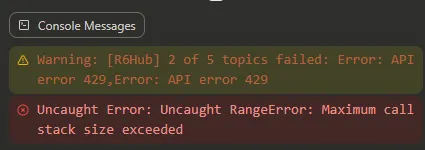
I was now 2 rounds of code audits in with no results. Trying to resolve these, I again opened a new chat in my project and pasted in the specific errors I was seeing. I asked Claude to troubleshoot these. It identified some problems, diagnosed some code issues, and suggested fixes. I asked it to implement the suggestions, but these didn’t resolve the issue.
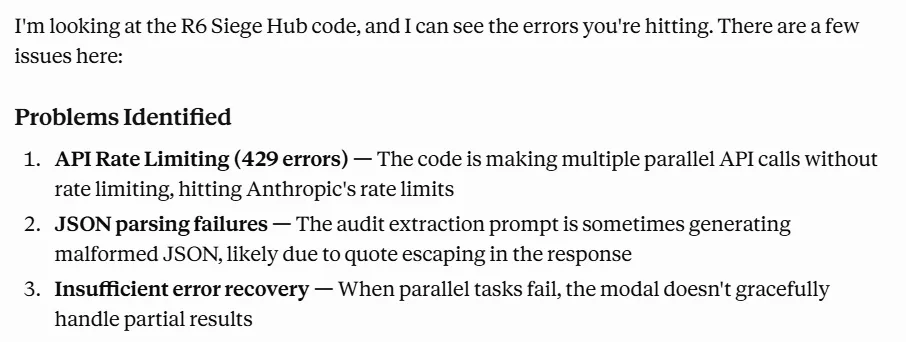
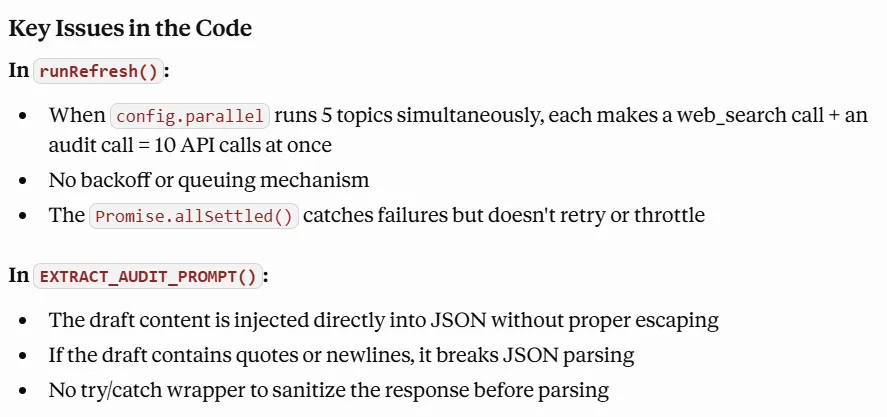
Ultimately, I never got the refined tracker to a good state. Even after a couple further prompts to try and fix the issues, I continued to get errors and the refresh never successfully happened.
Something that worked well was the process: set a gate for human verification before executing any changes. In this case, having Claude identify issues, plan an approach, and wait for my go ahead helped reduce the number of code edits. In case Claude had a suggestion I didn’t want to act on, or I wanted to take in another direction, I could make that change before it actually executed any work. This ties directly to the takeaway from Notebook 2 - planning can save significant time.
…But at least it looks pretty
After the broad code audits (but before the second round of debugging), I had decided to redo the styling of the tracker to make it look different. The lessons from my prior sessions were fresh in my mind; I wanted to avoid iterations that directly touched the code each time. So, before any edits, I worked with Claude to create a design plan. I used the same chat as the code audit but tried to clear the context window first. The goal was to wipe away old information and reset the chat so that fewer tokens were used and so that output could be higher quality and not tainted by prior interactions.AsideI'm not sure I did this right...I came across the context-clearing tip online. After doing some more reading, I’m not sure this actually did anything. I can’t find evidence that asking Claude to clear it’s context in a chat does anything. All the articles I’ve found (example) indicate that this is a Claude Code technique, that works with the /clear command. The theory behind it is sound; it saves space, making each ask more efficient, and it can reduce answer quality by keeping the context window leaner. There are also a series of other commands that can be used to manage the context window. Here’s a post that has a better explanation of these commands.
Once again, I assigned Claude a persona - this time of a visual designer who likes simple user interfaces.
Now I want you to take on the persona of a visual designer. You like to create visually engaging and compelling outcomes, but you are fanatical about preserving a simple user experience and user interface. Examine the current R6 Hub outcome. Suggest 3 different directions we can go to improve the UI and the visual presentation.Based on the suggestion that sounded best, I asked Claude to create a visual mock-up without touching the code. I used this to iterate quickly and come up with a design direction I felt good about.
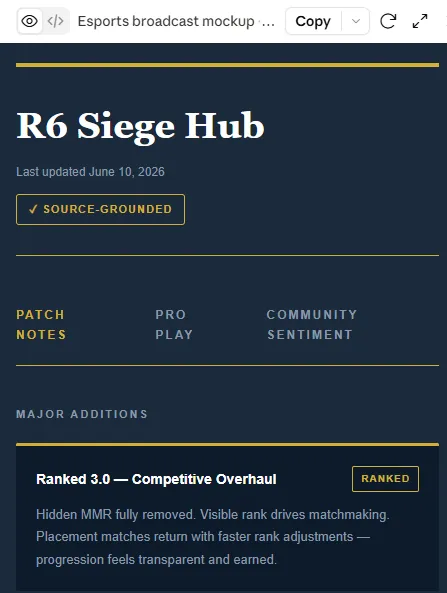
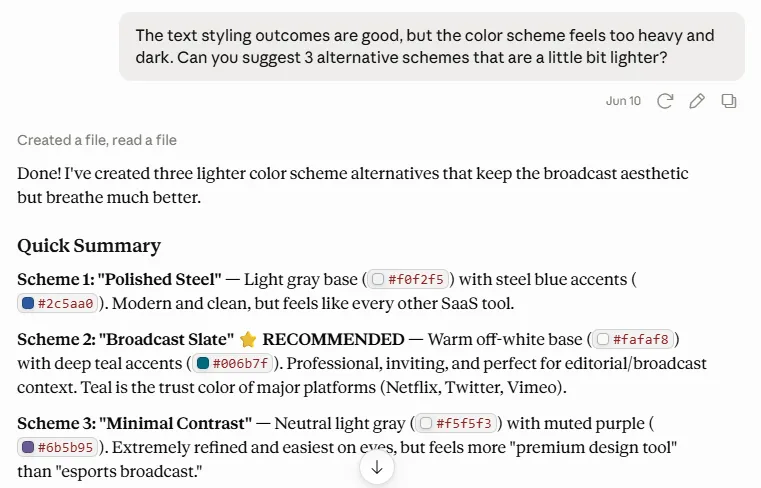
Then, I asked Claude to define the outcome I wanted in a design document. This document would be the input for rewriting the code, clearly laying out the target. It would also give me a chance to validate the instructions and approve the direction before touching the tracker itself.
Perfect. Let's go with this theme. Can you create a concise markdown file that defines the design direction and the key elements of this design? This should be something that can be passed as an input to an AI model that will give it all the direction it needs to update the HTML and CSS codeThe planning and iteration was easy and fast, and barely took up any of my usage. I also enjoyed the process a lot more than the code rewrites detailed in Notebook 2. On top of that, the design direction document generated was a really easy resource to look at and validate alignment on.
Finally, I asked Claude to reset its context window again and then execute the code updates based on the design direction document generated.
I would like you to create a new version of the R6 Hub that incorporates visual style updates. Please create a new version of the code file (attached). Apply the styling that is defined in the Design System Direction file (attached). As you go through with this update, take care to not change code functionality. Also be wary of adding bloat to the code.This was again fast and convenient. Claude did the bulk of the work in one pass, and then corrected any remaining errors after one validation pass.
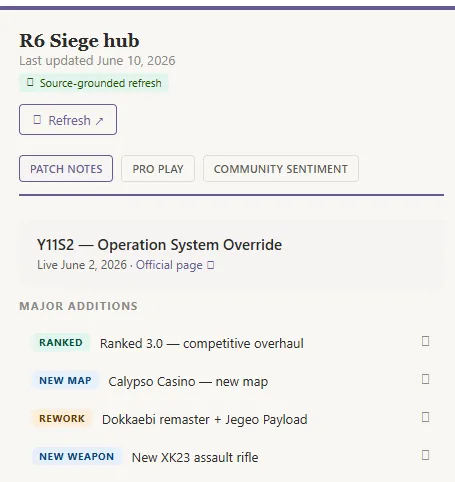
It was faster, easier, and simpler to do. It also made it easier to understand, validate, and correct the specific changes that were going to happen. I strongly recommend this approach.
One other reflection: I’m not sure the personas did much.
AsidePersona effectivenessThe research on persona-based prompting is divided. According to this source from the University of Florida, persona-based prompting:
- Improves response relevance,
- Enhances creativity and engagement,
- Personalizes responses more, and
- Helps AIs showcase empathy and understanding.
However, there studies on both sides of the equation. For example, this paper by Kim et al cautions against the use of personas, arguing that “inaccurately defined personas sometimes hinder LLMs and degrade their reasoning capabilities.” On the flip side, this paper by Xu et al showcases a framework for designing expert personas that perform better than no personas.
While the jury is still out, I found this blog post from PromptHub to be a helpful guide that parses through some of the research. The conclusion is that person-based prompting is more effective on open-ended tasks like writing than in accuracy-based tasks like classification, and it works best when the persona is specific and detailed.
I didn’t see much impact or change in Claude’s responses that reflected the persona I had assigned. This is not to say they truly didn’t have an impact, just that it wasn’t apparent to me.
Project Conclusion
With these last chat sessions, I concluded my work on the R6Hub. It was a helpful first project to learn and get to grips with what Claude could even do. I was a little bummed I didn’t have a usable outcome at the end, but that was a secondary goal. By the end of this project, I felt more confident about using AI. I had some strong takeaways that I could use to be more effective, and I had some new ideas for projects to tackle next.
This Notebook covers 2 chat sessions. Here are the links in case you would like to follow along. (note: ignore the final prompt where I ask for feedback. That’s the subject of a future project! I also don’t recommend this as a way of getting feedback): https://claude.ai/share/a8022f4a-52c8-4822-964f-9dff9bd379e7 https://claude.ai/share/c363f119-69b1-4190-9471-aea6189fc904